Adding a GUI app to the app launcher in cosmic desktop
When I started to create GUI apps instead of command line apps I noticed that if I simply add the binaries to my .local/bin or any other directories which are added to the $PATH there exists a little overhead in launchig the app. For launching I need to first open the terminal then type the name of executable. It works, but the terminal will be running in the background and also there involves multiple steps than just clicking the app icon on the app launcher. So I need to figure out a way to add my app to the launcher
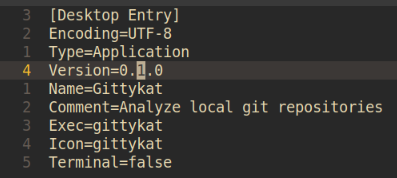
One method I found to do this in cosmic desktop (probably works with other desktop environments also) is by creating an appname.desktop file and placing it in the $HOME/.local/share/applications/ directory or /usr/share/applications/ directory (where the latter requires super user privilages). This is an example of my gittykat.desktop file.
-
Exec
Here we can provide the full path of executable binary or just the binary name if it is awailable in the
$PATH. -
Icon
We can give either a full path to the image file or just the file name without extension if it is placed in
/usr/share/pixmaps/directory. The second method requires super user privilages. I tried to create thepixmapsdirectory in$HOME/.local/share/but it doesn't work. When I inspected some other.desktopfiles they are also not mentioning the full path of icon but the icons are not in the/usr/share/pixmaps/directory. So there should be other methods too to add icons which I need to figure out.
After creating the appname.desktop file it will be automatically added to the app launcher.